
Introducing Moira
When we run broadcast newsdays at work, we want the process to be as close to industry as we can. A lot of that is about working practice. But it's the nature of broadcast that the process is not just about how you manage the people in the room, it's how you manage the material. Ultimately, it's how you get the stories out of the journalist and on air.
In industry, we have newsroom computer systems or NCRS to manage that. Systems that take stories and organise them into a running order. They take script and media files and make sure they appear in the studio; systems like iNews, ENPS or Burli.
In education, we may be lucky enough to have one of those systems in place. I'm lucky to have access to iNEWS and Burli at MMU. But if you're a small course, the expense of installing and managing an industry-level NCRS is likely prohibitive. Alternative solutions are often ingenious. I've seen collaborative environments like Google Drive pressed into service with great effect. Spreadsheets for running orders and shared docs for scripts. But successful as they are - and hey! If it works, it works - they don't offer that structured, industry-adjacent NCRS experience.
Of course, even if you do have these systems, they aren't trouble-free. Any newsday has a considerable technical and practical overhead - there's plenty that can go wrong! When it does, the solutions are not as quick and easy as you'd hope.
So when something goes wrong, or we need to do this stuff quickly and with an eye on industry practice, what are our options?
Introducing Moira
All of that pondering led me to wonder what an industry-adjacent response to that would be. What would be a low-overhead, low-resource but industry-similar experience of an NCRS that I could quickly press into service if required?
After some trial and error (and some therapeutic vibe coding over spring break) the result is Moira. Named after Moira Stewart, because if anyone could deliver a news bulletin like a boss, it was Moira Stewart.
What is Moira? Well, here's the TLDR:
- It's one HTML file. All you need is an internet connection to make it work. No local dependencies or server configuration. Just HTML and JavaScript.
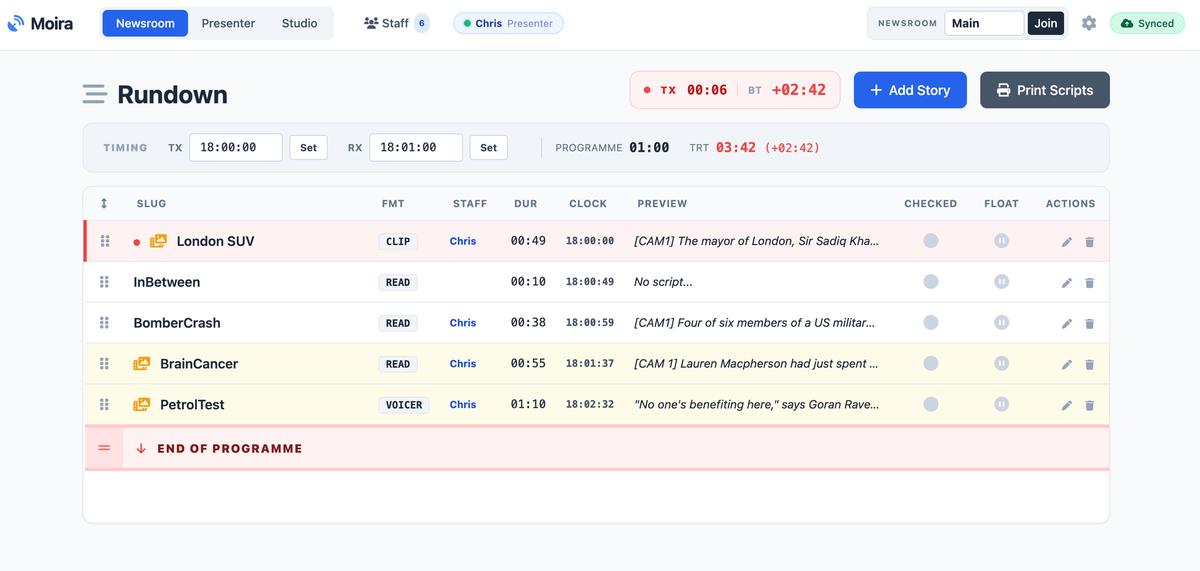
- It has a rundown section where journalists can work collaboratively to create, script and manage stories. Creating a rundown for a bulletin
- It has a presenter section which offers an autocue view and also a presenter view, useful to drop onto a tablet.
- It has a studio section to navigate the running order and timings
- The option to add media playback control for audio or video clips. Audio can be played via a selected audio device local to the machine. Video is done by integrating with OBS (very experimental)
Moira in more detail
Behind the scenes.
When you first open Moira, it runs in local mode. It's kind of a demo mode. But to make Moira really work, there needs to be a shared place for everything to be stored so people can access the content from different machines. That's the biggest hurdle for a low-overhead, low-resource system. We don't have time to raise a purchase order or ticket IT for some support to install software or open ports, etc. It needs to work on the existing (restrictive) networks.
The solution is to use a cloud-based database running on Google Firestore. What's that? In short, it's Google managing all the stuff that would normally mean a web server. The good news is it's free, at least at the level Moira uses it. And from what I can work out, you'd need to hammer it with a lot of users before you need to start paying.
The downside is that it needs setting up, which means diving into some pretty oblique menus. It's also storing your journalism on Google's servers. You can select where the servers live, but there's still a conversation here about data protection and access laws to consider. The final issue is that, out of the box, access to the database has no security. You can use passwords and even sign in with a Google ID. But there are some technical issues there which speak to the network issue. This is a compromise.
Less technically, there are some more industry adjacent settings. You can set the shorthand here for content and for roles. I've loaded it with job roles and content types that I think might be useful. You can add and edit the options. So if you prefer your OOV to an ULAY, you can set that up.
The Rundown tab
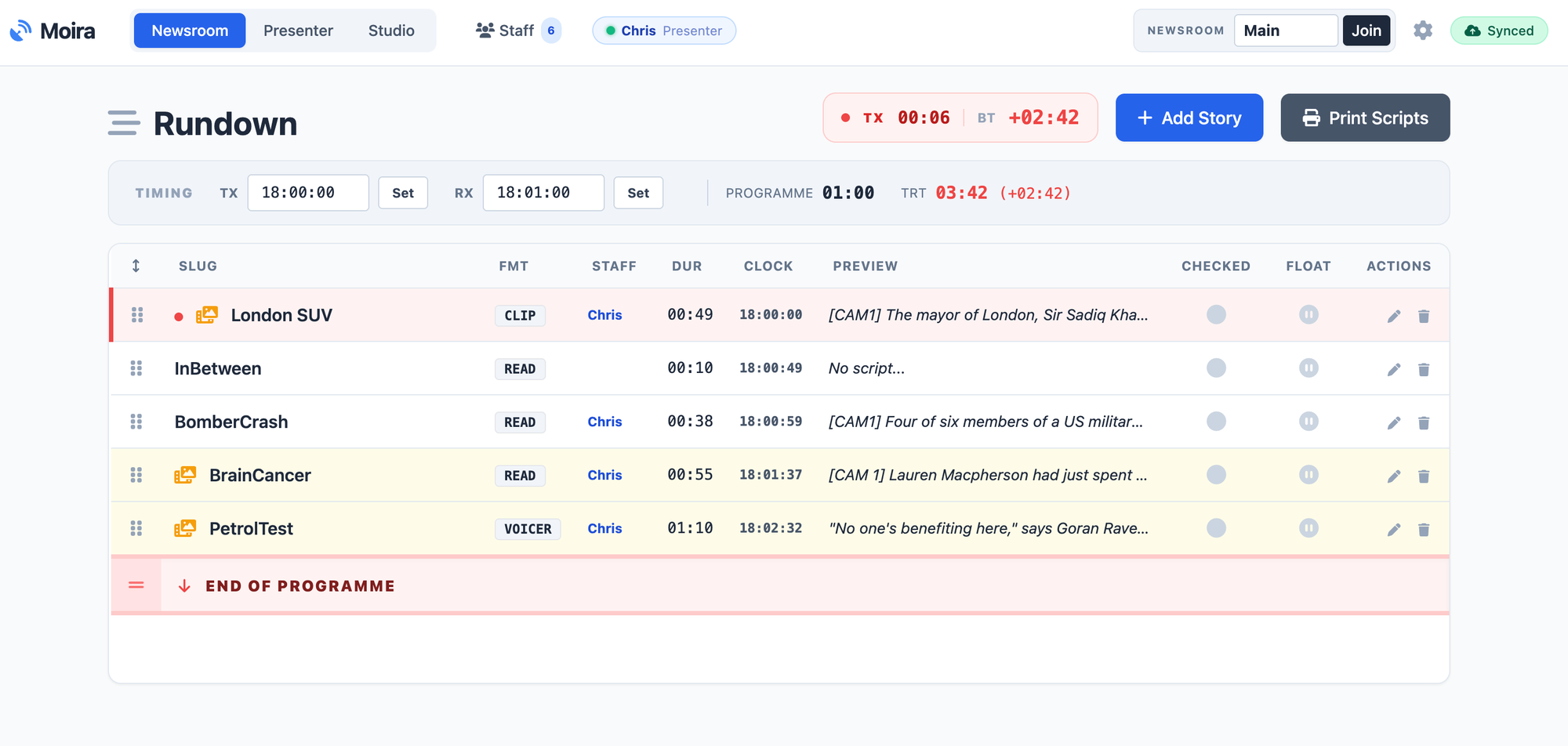
This is the editorial facing part of Moira. Each story has a line in the running order. Stories can be floated (left in the running order but not counted in the timings) or moved below the line as they drop off the running order.
Slugs can be directly edited in the run order. But to edit the script, you open an editor that allows you to add details like reporters, running time, and content type. You can also add tags to the script, like [CAM1], to appear as instructions. Indicative read times are also given.
There's an editorial workflow, of sorts, where stories can be flagged as ready for checking, need checking, or refused. There's also a locking system that means two people can't work on the same story.
The studio tab
This is intended to be a gallery/studio control. It shows what's live and what's next in the running order. If there are media clips, it will show A/B players and give you the option to cue and fire clips as required.
The presenter tab
This actually has two states. One is an autocue-style function that allows you to see the script. This can be scrolled locally and mirrored for on-camera autocue. The second state is the presenter view. This is a more information-led view designed for studio monitors and tablets. Presenters can see what the stories are, tap around, expand to see scripts, etc.
How it works in practice
The basic principle is that every machine you want to use in your bulletin needs to have the moira.html file on it. On your reporters' machines, they will mainly be looking at the Rundown tab. In your studio, you might have the Studio tab on the machine with playout capabilities. In the studio, you might have a teleprompter device with the autocue view loaded.
You can also have multiple windows open with the different views. So, if you have dual monitors, you might have Rundown on one and Studio on the other. All machines would speak to the Firebase database and update as required. If you wanted to use audio or video clips, each machine running Moira would need to be able to access a shared folder on the desktop.
Use case - radio news bulletin
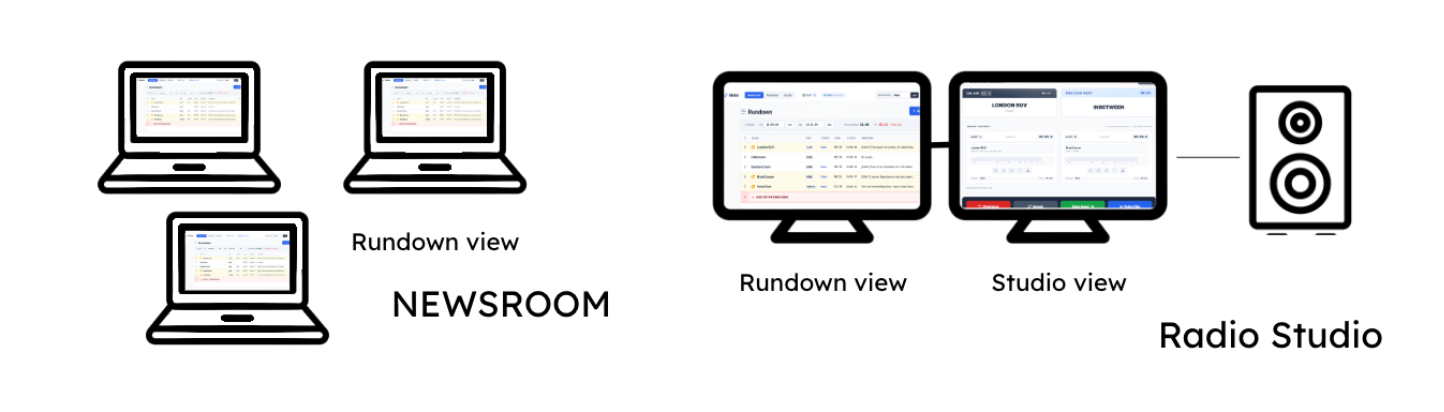
Each computer in the designated news room would open Moira.html and connect to the database. Any media items would be stored in a shared media folder, e.g., OneDrive.
- Reporters would work in the Rundown section.
- In the radio studio. Moira would be loaded on a machine with a soundcard connected to the studio desk/output. Moira would run in Studio mode. If there is a second monitor, they may also want to run Rundown or Autocue mode.
- During the bulletin, the newsroom can monitor what is on air via the rundown. The studio can trigger clips to play through the sound card.
Next Steps.
As much as I want Moira to be a working newsroom system, it's also an experiment in how far you could push a 'one web page' solution. It's a restriction I've been using when I've been playing with apps because of the nature of our uni IT infrastructure - more of those experiments here. That's not without its challenges - not least having to use an external database. In that sense, it's as much about how we effectively work in and around the restrictions we face.
It's also an exercise in vibe coding - full transparency there. I would still be coding at the heat death of the universe if I were doing my traditional Google, cut and paste form of coding I know generative AI is a point of friction in education and journalism, but I can't say this project was conceived to explore that. However, it has made me think a lot about what it means beyond the usual concerns of plagiarism or automation and how it can really accelerate ideation/experimentation and innovation.
Ultimately, I hope that someone, somewhere, finds it useful - whether it's a low-impact way to introduce and manage newsdays or something in reserve when things go wrong. To that end, I'll be tweaking it and updating the instructions.
Let me know if you do get any use out of it.